来源:Nordic半导体
随着 nRF7000 Wi-Fi 协同 IC 的推出,我们现在可以提供具有 Wi-Fi、蜂窝物联网和 GNSS 功能的完整硅到云定位解决方案。nRF7000 针对 Wi-Fi 网络扫描进行了优化,与 nRF91 系列蜂窝物联网模组配合使用,可实现基于 SSID 的 Wi-Fi 定位。Nordic基于SSID的Wi-Fi定位可以在室内和室外、城市和郊区以极其省电的方式获取精确的位置信息。这是对全球导航卫星系统(GNSS)的重要补充,尤其是在建筑物和密集城区,GNSS 可能会因信号衰减和中断而失效。
本博文将介绍我们基于 SSID 的 Wi-Fi 定位解决方案的工作原理以及如何开始测试。然后,我们将使用 nRF9160 DK、nRF7002 EK和 PPK2 执行并展示实际功耗和准确性测量,以比较 nRF Cloud 提供的不同定位服务的性能。
背景知识
1Wi-Fi 定位服务
Wi-Fi 是一种著名的无线网络技术,用于设备的局域网和互联网接入。Wi-Fi 通过 Wi-Fi 网络为家庭、办公室和学校等环境提供便捷的无线互联网接入服务。
Wi-Fi 定位是一种地理定位功能,可让支持 Wi-Fi 的设备利用附近 Wi-Fi 网络的数据确定自己的大致位置。它的工作原理是检索附近网络的 SSID、BSSID 和信号强度等 Wi-Fi 网络信息,并将这些信息与已知位置的 Wi-Fi 网络数据库进行比较。
Wi-Fi 定位系统包含以下关键组件:
用户设备中的 Wi-Fi 无线电设备,用于检测附近的网络。
将 MAC 地址等 Wi-Fi 网络信息映射到位置的数据库。该数据库由定位服务提供商维护。
通过查找数据库中的匹配模式并计算信号强度来估计位置的算法。
当设备查询定位服务时,它会提供它能看到的所有 Wi-Fi 网络的数据。该服务会在其数据库中查找这些网络,找到相关位置,并根据相似性和信号强度估算设备的位置。
2nRF Cloud Wi-Fi 定位服务
nRF Cloud 提供的定位服务专为 Nordic 硅芯片量身定制,具有快速、省电的定位功能。它们可以帮助需要定位数据而又不需要高功耗的设备和应用。提供多种定位技术,包括 Assisted-GPS、Predictive-GPS、Single-Cell、Multi-Cell 和 Wi-Fi 定位。
通过利用 nRF Cloud 的优化定位算法,基于 Nordic SoC 和 模组的产品可在定位用例中实现高性能和超低功耗。对于 Wi-Fi 定位请求,nRF Cloud 可借助 Wi-Fi 数据库计算设备位置,该数据库包含不同 Wi-Fi 网络的坐标。然后,设备位置将从 nRF Cloud发送到客户云或返回到设备。
3nRF70 系列
Nordic Semiconductor 于今年年初发布了我们的 Wi-Fi 产品系列 nRF70 系列。该系列推出的首款芯片是 nRF7002,它是一款超低功耗双频无线协同 IC,可为另一款主芯片添加低功耗 Wi-Fi6 功能。
此外,我们最近还推出了专用于该用例的 nRF7000。这是一款双频 Wi-Fi 配套 IC,不发送数据,但可以进行主动和被动扫描,纯粹用于 Wi-Fi 定位目的。结合我们的 nRF9160 蜂窝物联网模组和 nRF Cloud服务,nRF7000 可通过嗅探本地 Wi-Fi 接入点的 SSID 实现基于 Wi-Fi 的定位服务。
Wi-Fi 定位服务流程
nRF Connect SDK 中的 Cellular: Location示例演示了如何使用 nRF Cloud 提供的不同定位服务。
让我们测试一下 nRF Cloud Wi-Fi 定位服务如何在室内环境中工作。
硬件:nRF9160 DK、nRF7002 EK、PPK2。
软件:nRF Connect SDK v2.4.2、MFW v1.3.5、nRF Connect for Desktop 中的 Power Profiler 应用程序。
硬件连接设置如下图所示。在 Power Profiler 应用程序中,配置 PPK2 源表模式,为 DK 上的 nRF9160模组供电并记录其电流消耗变化。

Cellular: Location 示例中最初的 location_wifi_get() 函数可用于请求 Wi-Fi 定位服务。启用附加日志配置有助于了解请求过程
# Add the following lines to the end of prj.conf


CONFIG_LOCATION_LOG_LEVEL_DBG=y


CONFIG_NRF_CLOUD_REST_LOG_LEVEL_DBG=y


CONFIG_REST_CLIENT_LOG_LEVEL_DBG=y


CONFIG_NRF_CLOUD_LOG_LOG_LEVEL_DBG=y


CONFIG_NRF_CLOUD_LOG_LEVEL_DBG=y
让我们来了解一下如何使用 location_wifi_get() 请求 Wi-Fi 定位服务。我们将这一过程分为三个步骤来解释 Wi-Fi 定位服务请求过程。
步骤 1:扫描 Wi-Fi 接入点信息
在此步骤中,配置 Wi-Fi 定位服务,设备开始扫描附近的 Wi-Fi 接入点。结果显示,设备在奥斯陆Nordic Semiconductor办公楼附近或内找到了 14 个 Wi-Fi 接入点。
Requesting Wi-Fi locationwithGNSSandcellular fallback... [0019.903,594]location: location_core_config_log: Location configuration: [0019.911,682] location: location_core_config_log: Methods count:1 [0019.919,342] location: location_core_config_log: Interval:0 [0019.926,605] location: location_core_config_log: Timeout:300000ms [0019.934,356] location: location_core_config_log: Mode:0 [0019.941,223] location: location_core_config_log: List of methods: [0019.948,913] location: location_core_config_log: Method#0 [0019.956,146] location: location_core_config_log: Method type: Wi-Fi (3) [0019.964,660] location: location_core_config_log: Timeout:30000ms [0019.972,686] location: location_core_config_log: Service: Any (0) [0020.044,921] location: location_request_info_crea te: Wi-Fiandcellular methods arenotone after the otherinmethod list so they arenotcombined [0020.059,448] location: location_core_location_get_pos: Requesting locationwith'Wi-Fi'method [0020.069,458] location: location_core_location_get_pos: Starting request timerwithtimeout=300000 [0020.079,711] location: location_core_timer_start: Starting timerwithtimeout=30000 [0020.088,745] location: s can_wifi_start: Triggering start of Wi-Fi scanning [0024.832,458] location: scan_wifi_result_handle: scan result#1 stored: ssid XXXX, channel 108, mac 24daxx:xx [0024.845,184] location: scan_wifi_result_handle: scan result#2 stored: ssid XXXX, channel 108, mac 24daxx:xx [0024.858,093] location: scan_wifi_result_handle: scan result#3 stored: ssid XXXX, channel 11, mac 24daxx:xx [0024.870,910] location: scan_wifi_result_handle: scan result#4 stored: ssid XXXX, channel 11, mac 24daxx:xx [0024.883,483] location: scan_wifi_result_handle: scan result#5 stored: ssid XXXX, channel 1, mac 24daxx:xx [0024.896,209] location: scan_wifi_result_handle: scan result#6 stored: ssid XXXX, channel 1, mac 24daxx:xx [0024.908,935] location: scan_wifi_result_handle: scan result#7 stored: ssid XXXX, channel 1, mac 24daxx:xx [0024.921,417] location: scan_wifi_result_handle: scan result#8 stored: ssid XXXX, channel 64, mac 24daxx:xx [0024.933,990] location: scan_wifi_result_handle: scan result#9 stored: ssid XXXX, channel 64, mac 24daxx:xx [0024.946,807] location: scan_wifi_result_handle: scan result#10 stored: ssid XXXX, channel 6, mac 8a85xx:xx [0024.959,442] location: scan_wifi_result_handle: scan result#11 stored: ssid XXXX, channel 100, mac 24daxx:xx [0024.972,167] location: scan_wifi_result_handle: scan result#12 stored: ssid XXXX, channel 6, mac 3409xx:xx [0024.984,649] location: scan_wifi_result_handle: scan result#13 stored: ssid XXXX, channel 132, mac 24daxx:xx [0024.997,619] location: scan_wifi_result_handle: scan result#14 stored: ssid XXXX, channel 132, mac 24daxx:xx [0025.010,284] location: scan_wifi_done_handle: Scan request donewith14Wi-Fi Aps
步骤 2:请求 nRF Cloud Wi-Fi 定位
nRF9160 会将 Wi-Fi 接入点信息(包括 MAC 地址、SSID、信号强度和信道)编码为 JSON 文件。然后,JSON 文件将被发送到 nRF Cloud,nRF Cloud 将使用这些数据检查 Wi-Fi 定位数据库,并使用特定算法计算设备位置。结果包含纬度、经度、精确度等信息。有关 API 请求和响应格式,请参阅 nRF Cloud REST API 文档。
[0025.028,015]location: cloud_service_location_get: Cloud service location pa ramete rs: [0025.037,170] location: cloud_service_location_get: Service:0 [0025.044,494] location: cloud_service_location_get: Timeout:25060ms [0025.052,337] location: cloud_service_nrf_pos_get:Sending positioningrequest(REST) [0025.160,125] nrf_cloud_codec_internal: nrf_cloud_location_req_json_encode: JSON: {"wifi":{"accessPoints":[{"macAddress":"24daxx:xx","ssid":"XXXX","signalStrength":-41,"channel":108},{"macAddress":"24daxx:xx","ssid":"XXXX","signalStrength":-41,"channel":108},{"macAddress":"24daxx:xx","ssid":"XXXX","signalStrength":-48,"channel":11},{"macAddress":"24daxx:xx","ssid":"XXXX","signalStrength":-49,"channel":11},{"macAddress":"24daxx:xx","ssid":"XXXX","signalStrength":-63,"channel":1},{"macAddress":"24daxx:xx","ssid":"XXXX","signalStrength":-70,"channel":1},{"macAddress":"24daxx:xx","ssid":"XXXX","signalStrength":-70,"channel":1},{"macAddress":"24daxx:xx","ssid":"XXXX","signalStrength":-72,"channel":64},{"macAddress":"24daxx:xx","ssid":"XXXX","signalStrength":-72,"channel":64},{"macAddress":"8a85xx:xx","ssid":"XXXX","signalStrength":-73,"channel":6},{"macAddress":"24daxx:xx","ssid":"XXXX","signalStrength":-75,"channel":100},{"macAddress":"3409xx:xx","ssid":"XXXX","signalStrength":-76,"channel":6},{"macAddress":"24daxx:xx","ssid":"XXXX","signalStrength":-85,"channel":132},{"macAddress":"24daxx:xx","ssid":"XXXX","signalStrength":-85,"channel":132}]}} [0025.283,142] rest_client: rest_client_request: Requesting destination HOST: api.nrfcloud.com at port443, URL: /v1/location/ground-fix [0025.296,966] rest_client: rest_client_request: Payload: {"wifi":{"accessPoints":[{"macAddress":"24daxx:xx","ssid":"XXXX","signalStrength":-41,"channel":108},{"macAddress":"24daxx:xx","ssid":"XXXX","signalStrength":-41,"channel":108},{"macAddress":"24daxx:xx","ssid":"XXXX","signalStrength":-48,"channel":11},{"macAddress":"24daxx:xx","ssid":"XXXX","signalStrength":-49,"channel":11},{"macAddress":"24daxx:xx","ssid":"XXXX","signalStrength":-63,"channel":1},{"macAddress":"24daxx:xx","ssid":"XXXX","signalStrength":-70,"channel":1},{"macAddress":"24daxx:xx","ssid":"XXXX","signalStrength":-70,"channel":1},{"macAddress":"24daxx:xx","ssid":"XXXX","signalStrength":-72,"channel":64},{"macAddress":"24daxx:xx","ssid":"XXXX","signalStrength":-72,"channel":64},{"macAddress":"8a85xx:xx","ssid":"XXXX","signalStrength":-73,"channel":6},{"macAddress":"24daxx:xx","ssid":"XXXX","signalStrength":-75,"channel":100},{"macAddress":"3409xx:xx","ssid":"XXXX","signalStrength":-76,"channel":6},{"macAddress":"24daxx:xx","ssid":"XXXX","signalStrength":-85,"channel":132},{"macAddress":"24daxx:xx","ssid":"XXXX","signalStrength":-85,"channel":132}]}}[00:01:25.417,358] rest_client: rest_client_sckt_connect:Doinggetaddrinfo()withconnect addr api.nrfcloud.com port 443 [0025.435,699] rest_client: rest_client_sckt_connect:getaddrinfo() 52.70.xxx.xxx [0025.445,892] rest_client: rest_client_sckt_connect: Connecting to api.nrfcloud.com port 443 +CSCON: 1 [0026.902,130] rest_client: rest_client_http_response_cb: HTTP: All datareceived(content/total:79/328), status: 200 OK [0026.914,245] rest_client: rest_client_request: API call response len: http status: 200, 79 bytes [0026.926,025] location: location_core_event_cb_fn: Location acquired successfully: [0026.934,844] location: location_core_event_cb_fn: method: Wi-Fi(3) [0026.942,901] location: location_core_event_cb_fn: latitude: 59.920980 [0026.950,988] location: location_core_event_cb_fn: longitude: 10.689317 [0026.959,136] location: location_core_event_cb_fn: accuracy: 15.0 m [0026.966,857] location: location_core_event_cb_fn: date: 2023-08-31 [0026.974,609] location: location_core_event_cb_fn: time: 1340.035 UTC [0026.982,879] location: location_core_event_cb_fn: Google maps URL: https://maps.google.com/?q=59.920980,10.689317 Got location: method: Wi-Fi latitude: 59.920980 longitude: 10.689317 accuracy: 15.0 m date: 2023-08-31 time: 1340.035 UTC Google maps URL: https://maps.google.com/?q=59.920980,10.689317
步骤 3:设备进入休眠状态
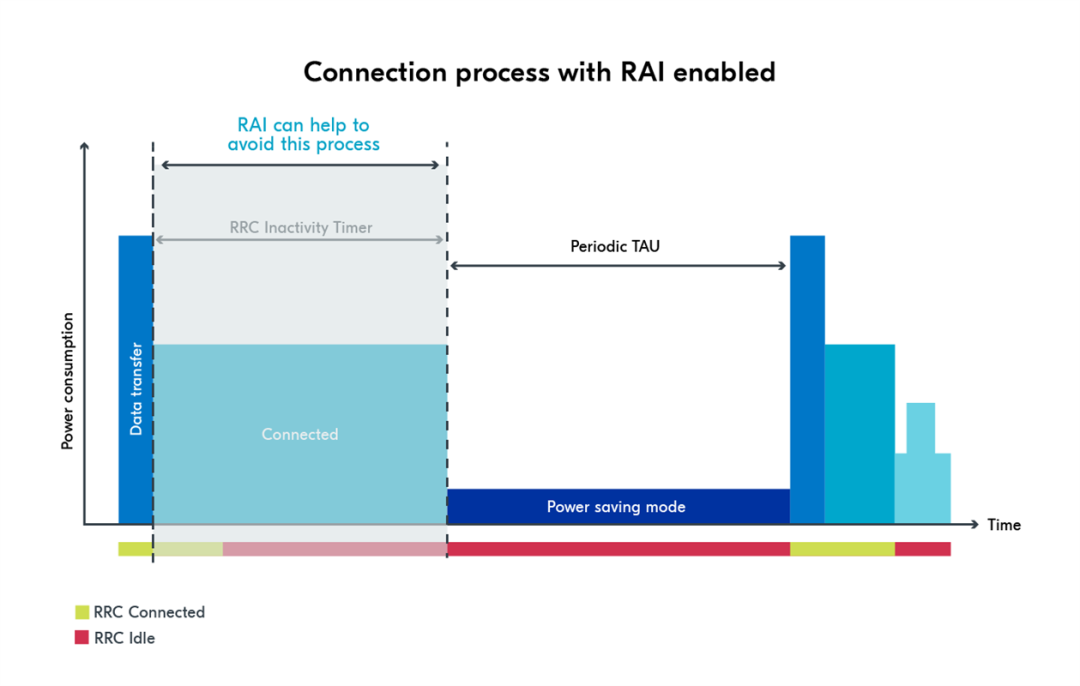
当 RRC 非活动定时器到期时,nRF9160 将进入 RRC 空闲状态。我将活动定时器 (T3324) 设置为 0 (CONFIG_LTE_PSM_REQ_RAT=“00000000”) 以帮助设备进入 RRC 空闲状态后立即进入 PSM 以节省功耗。RRC 闲置定时器由移动网络运营商配置(此处挪威电信为 5 秒)。如果 MNO 支持快速释放功能 (AS-RAI),设备可通过发送 RAI 通知基站释放它们之间的无线连接,从而立即进入 RRC 空闲状态。这将进一步降低总功耗。您可以从这篇博客中了解有关 RAI 的更多信息:
最大限度延长蜂窝物联网的电池寿命: 对 eDRX、PSM 和 AS-RAI 的分析。
https://www.nordicsemi.cn/blog/maximizing-battery-lifetime-in-cellular-iot-an-analysis-of-edrx-psm-and-as-rai/
比较实践中的定位服务
nRF Cloud 中提供的定位服务在定位精度和功耗方面性能各异,您可以根据自己的应用需求选择最适合的服务。
图:定位服务的定位精度和功耗
功耗:GNSS 定位服务在定位搜索过程中的耗电量约为 50mA,在没有辅助的情况下,搜索过程可能会持续几十秒到几分钟。即使有 A-GPS 数据辅助,首次定位时间(TTFF)仍需数秒。基于 Wi-Fi 和蜂窝网络的定位服务耗电量要少得多,因为它们会从 Wi-Fi 接入点或蜂窝基站收集周围数据,然后将收集到的数据发送到 nRF Cloud进行设备定位。这些过程纯粹是互联网通信,因此功耗大大低于全球导航卫星系统操作。
准确性:但在精确度方面,情况恰恰相反。全球导航卫星系统的定位精度高于其他两种系统,而 Wi-Fi 的定位精度则高于蜂窝定位服务。
在为应用选择合适的定位服务时,功耗和准确性是最重要的考虑因素,但您还应考虑室内/室外环境使用、Wi-Fi 和蜂窝网络覆盖等因素,以选择最佳的定位服务或在它们之间进行切换。下表列出了不同 nRF Cloud 定位服务的性能,并根据准确性、延迟和功耗等因素进行了衡量。
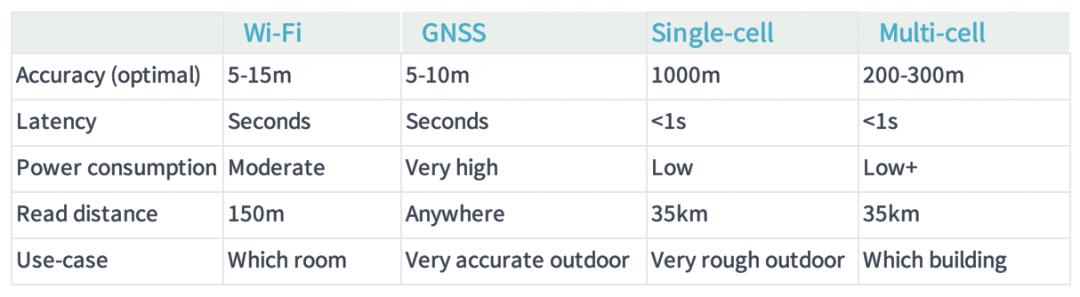
图表中的表格列出了不同定位服务的最佳精度;实际精度在实践中会有所不同。例如,在高楼林立的城市中,由于反射和建筑物会干扰 GNSS 信号,GNSS 定位服务的精度可能比 Wi-Fi 低。根据应用需求选择正确的定位服务方法并通过测量评估实际位置精度和功耗非常重要。
为了帮助您了解如何在实践中进行评估,我们对使用不同定位方法时的功耗进行了测量。测量仍然基于 nRF Connect SDK 样本 Cellular: Location。测试地点位于Nordic Semiconductor奥斯陆办公楼的楼顶。
1基于蜂窝的定位服务
定义了以下新函数 location_cellular_get(),用于测试蜂窝定位服务。
/**


*@briefRetrieve location with cellular location service.


*/


staticvoidlocation_cellular_get(void)
{


int err;


structlocation_configconfig;


enumlocation_methodmethods[] = {LOCATION_METHOD_CELLULAR};


location_config_defaults_set(&config,ARRAY_SIZE(methods), methods);


printk("Requesting cellular location...
");


err =location_request(&config);


if(err) {


printk("Requesting location failed, error: %d
", err);


return;


}


location_event_wait();


}
蜂窝定位服务的功耗结果与 Wi-Fi 定位服务非常相似。下图显示了蜂窝定位服务的 PPK2 测量结果。
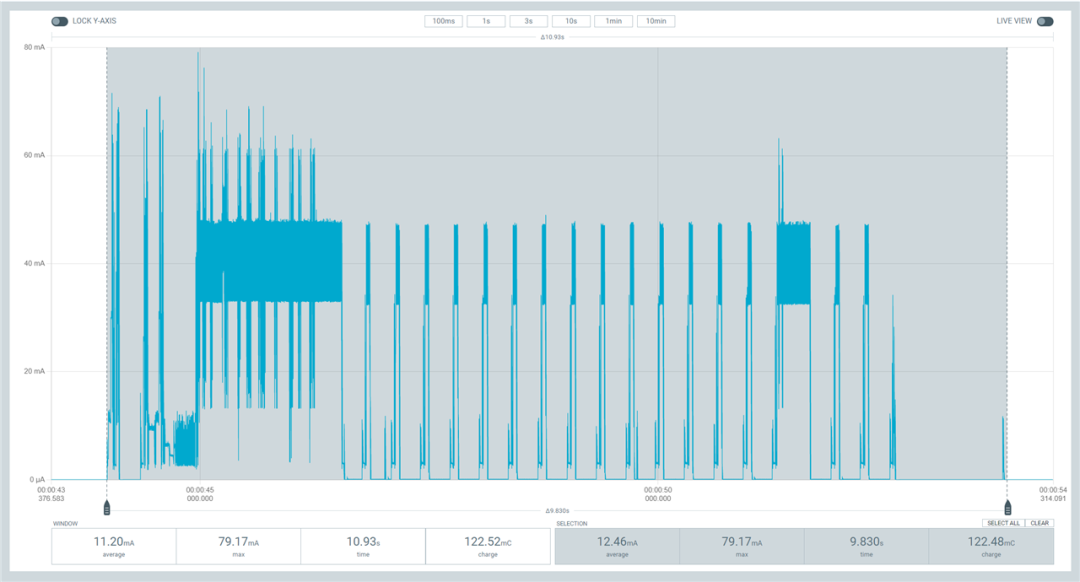
以下是测试的日志输出。该蜂窝定位服务请求的总功耗为 122.48 mC,精确度为 1708.0 m。
Requestingcellular location...


Gotlocation:


method: Cellular


latitude:59.920624


longitude:10.689719


accuracy:1708.0m


date:2023-09-04


time:12:47:23.399UTC


Googlemaps URL: https://maps.google.com/?q=59.920624,10.689719
2基于 Wi-Fi 的定位服务
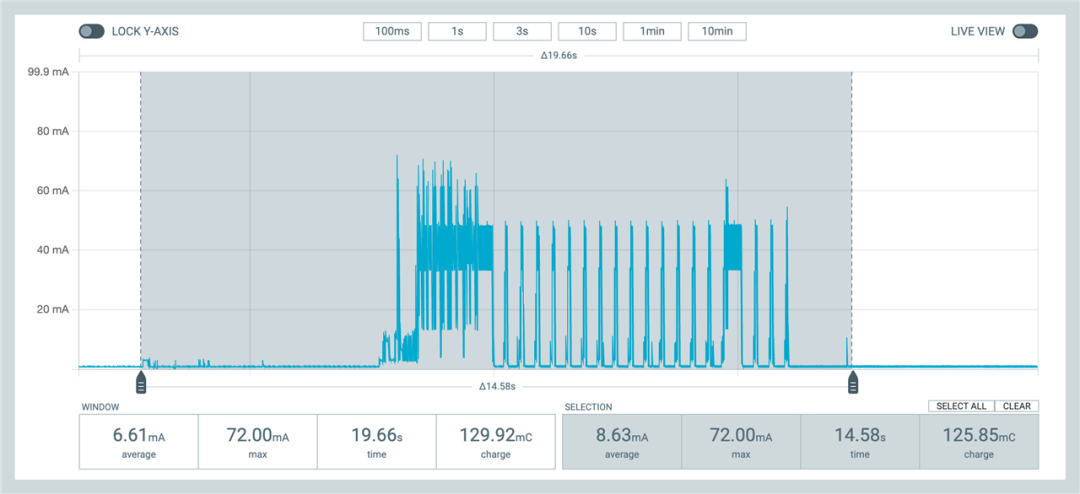
以下捕获使用 location_wifi_get 函数请求 Wi-Fi 定位服务。该事件的总功耗为 125.85mC,日志显示精确度为 30.0m。
Gotlocation:


method: Wi-Fi


latitude:59.919015


longitude:10.688577


accuracy:30.0m


date:2023-09-04


time:12:47:51.753UTC


Googlemaps URL: https://maps.google.com/?q=59.919015,10.688577
2使用 A-GPS提供基于GNSS 的定位服务
样本中的原始函数 location_gnss_low_accuracy_get() 用于 GNSS 定位服务请求,并启用了 A-GPS 辅助功能。
低精度模式可让 GNSS 展示较宽松的固定接受标准,以节省功耗。GNSS 定位服务有三种精度模式:低精度、正常精度和高精度。精度越高,设备的耗电量就越大,但根据经验,我们知道所有精度模式的耗电量都高于 Wi-Fi 和蜂窝定位服务。
在 GNSS 定位服务测量中,我们预计即使 GNSS 的低精度模式也会比 Wi-Fi 和蜂窝定位服务提供更好的定位精度,因此在测量中使用了低精度模式,我们可以看到 GNSS 与其他定位服务 “最接近 ”的功耗差异。结果确实证明了这一假设。A-GPS 数据只请求一次,以加快 TTFF 的速度。请注意,只要设备中的历书和星历数据仍然有效,就不需要 A-GPS 请求。
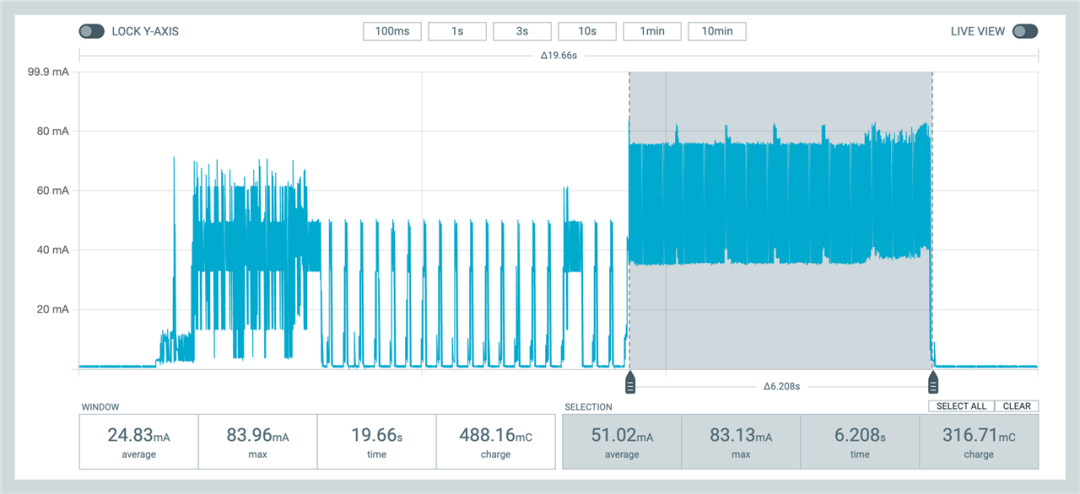
PPK2 测量结果显示,在没有 A-GPS 数据请求过程的情况下,该事件的总电荷量为 316.71mC,日志显示精度为 16.9m。
Gotlocation:


method: GNSS


latitude:59.920928


longitude:10.689040


accuracy:16.9m


date:2023-09-04


time:12:48:34.586UTC


Googlemaps URL: https://maps.google.com/?q=59.920928,10.689040
结果
下面是我们在奥斯陆Nordic Semiconductor 办公室屋顶进行的功耗和精度测量结果。
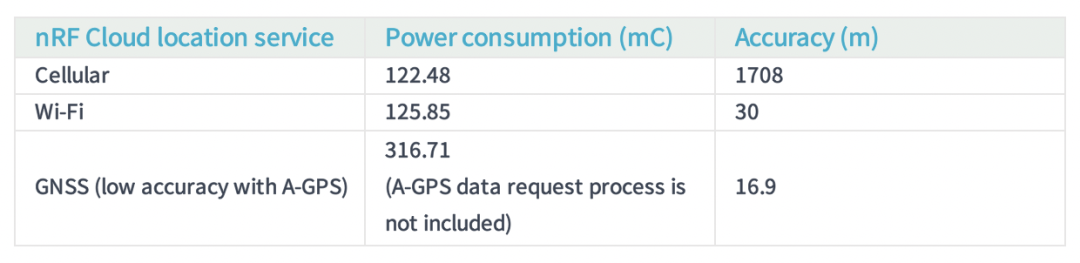
我们可以看到,这些测量结果正确反映了 “位置服务的定位精度和功耗 ”图中的内容。在一般情况下,Wi-Fi 是一种很好的定位服务方法,它能以较低的功耗获得很高的精度。
请注意,图表中的表格列出了不同定位服务的最佳精度;实际精度在实践中会有所不同。例如,在高楼环绕的城市中,由于反射和建筑物会干扰 GNSS 信号,GNSS 定位服务的精度可能比 Wi-Fi 低。根据应用需求选择正确的定位服务方法并通过测量评估实际定位精度和功耗非常重要。